What a Tracking Pixel Sends Before You Click Accept, One Request at a Time
A tracking pixel is a small piece of code an advertising or analytics company gives a website. The site pastes it into its pages, and from then on every visitor’s browser reports to that company. Meta, Google, TikTok, LinkedIn, Microsoft, Pinterest, Snap and X all have one. A typical shop runs several.
What the pixel reports is decided by the pixel and by how the site set it up. The visitor never sees it. Here is what’s actually in one of those reports, and why it matters when it goes out before anyone clicks “Accept”.
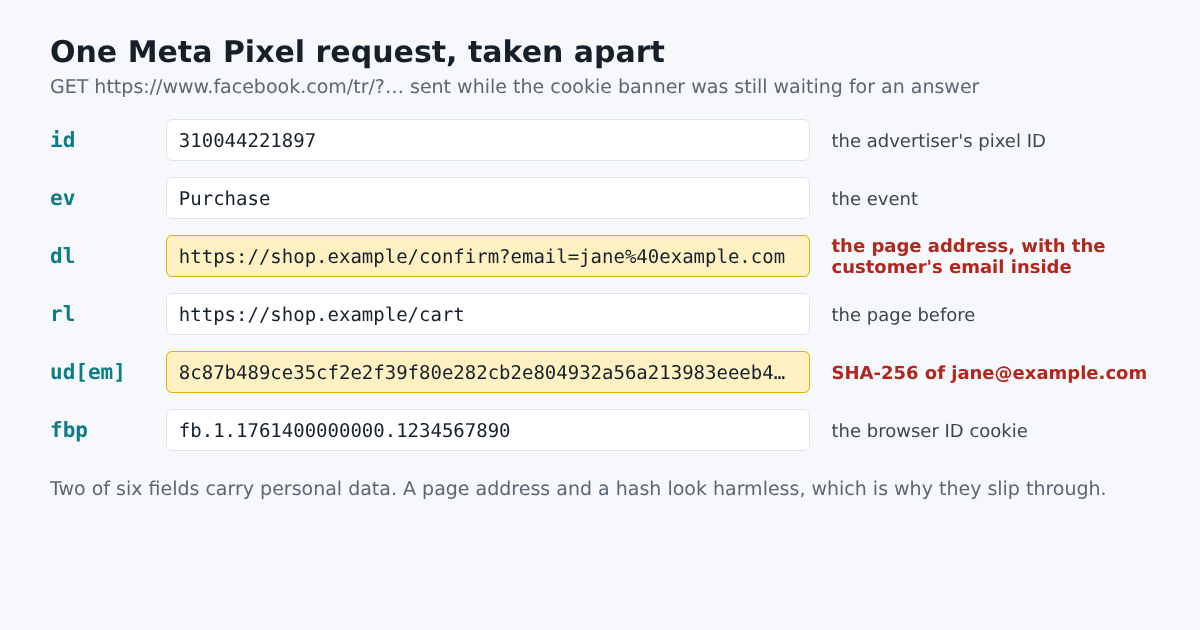
The Request Is the Report
When a page with the Meta Pixel loads, the browser sends something like this to www.facebook.com/tr:
id=310044221897
ev=PageView
dl=https://shop.example/checkout/confirm?order=10442&email=jane%40example.com
rl=https://shop.example/cart
ud[em]=8c87b489ce35cf2e2f39f80e282cb2e804932a56a213983eeeb428407d43b52d
id says which advertiser’s account the visit belongs to. ev is the event: a page view, a purchase, a sign-up. dl is the page the visitor is on, the whole address. rl is where they came from. ud[em] is the visitor’s email address, hashed. Other pixels use other names for the same things. Google Analytics calls the page dl too and the page title dt, TikTok puts it at context.page.url, Microsoft’s tag calls it p.
Two of those fields cause most of the trouble.
The Page Address Carries More Than a Page
dl looks harmless, since it’s only the address of the page. But addresses carry whatever the site put in them. In the example the shop’s order confirmation page has the customer’s email in its query string, so sending the page address sends the email. Search pages put the search term in the address (/search?q=pregnancy+test). A clinic’s pages are named after conditions (/conditions/anxiety). A lender’s are named after money trouble (/loans/debt-consolidation). None of this is personal data on its own, but next to the pixel’s browser ID it says who was there.
A Hash Is Not a Disguise
ud[em] is the email address run through SHA-256, a one-way function. It looks like anonymous noise. It isn’t, because the company receiving it has the same hash of the same address from its own users, and matching the two is the point: Meta calls the feature “advanced matching”, Google calls it “enhanced conversions”. Anyone who knows an address can compute its hash in a millisecond and look for it. That’s also how PXTA spots them: it hashes every address it sees on the site, plus the test address it types into forms, and searches the requests for the result.
Some pixels fill the hashed email in without the site doing anything. They read email fields on the page as the visitor types, and send the hash with the next event.
Where the Consent Banner Comes In
In many places a site needs a visitor’s consent before tracking like this, which is why banners ask. But the banner is a separate piece of code from the pixels, and nothing joins them up by itself. The site has to make each pixel wait for a “yes”, and keep waiting after a “no”. When that wiring is missing, the pixel loads with the page and reports before the banner has even finished drawing, or carries on after the visitor rejects.
Google added a signal for this, Consent Mode: its tags send a short code, gcs, saying whether the site told them consent was granted. G100 means denied for both ads and analytics, G111 granted. A tag that says G111 after the visitor clicked “Reject all” is reporting that the banner’s answer never reached it.
Checking It
All of this is visible from the browser, which is where PXTA looks. It loads each page three times, once with the banner unanswered, once after rejecting and once after accepting, and records every request each pixel sends. Then it unpacks each value, the addresses inside addresses, the JSON, the base64, the hashes, and writes a finding for anything that shouldn’t be there: On /checkout/confirm, the Meta Pixel sent an email address inside the page address before the consent banner was answered.
What it can’t see is anything a site sends from its own servers. Server-side tagging and conversion APIs skip the browser entirely, so an audit of the browser is the floor of what’s being shared. It isn’t the ceiling.