Tracking Requests From Iframes and Web Workers, the Ones a Page Source Check Never Finds
The quickest way to see which trackers a site uses is to read its HTML and look for known scripts. Plenty of free tools do just that. It finds the Meta Pixel in the page template, and it misses everything that isn’t there.
Two places hide tracking from that kind of check: iframes and web workers.
Iframes
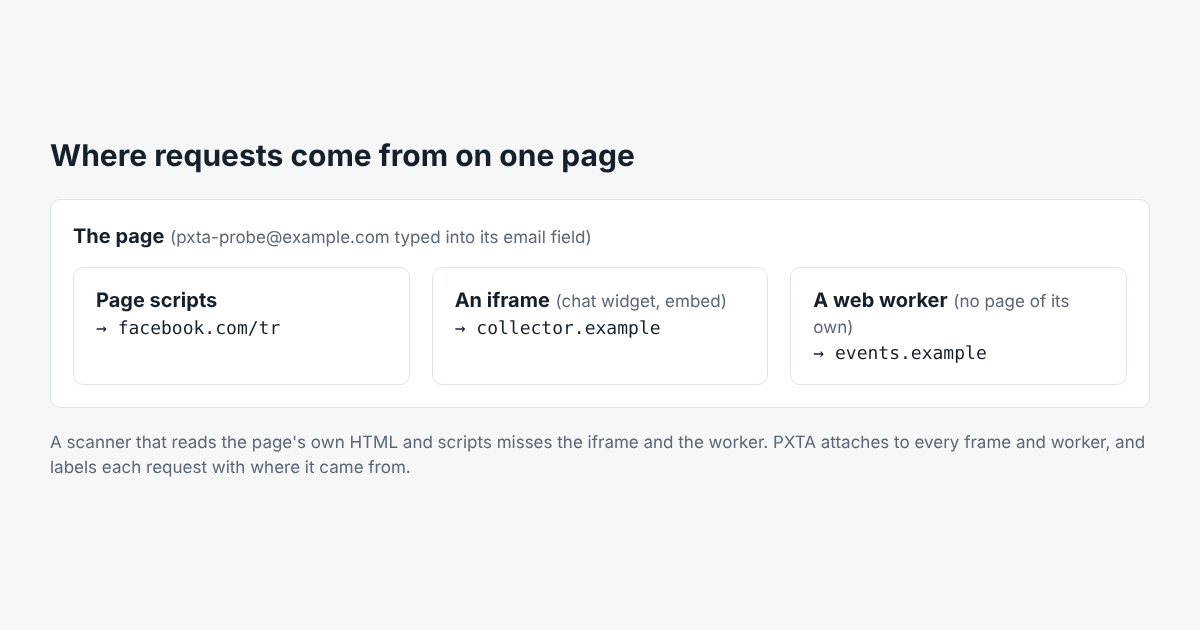
An iframe is a page inside the page. Chat widgets, booking forms, video players, review badges and consent banners themselves often run in one. The iframe loads its own scripts from its own server, and those scripts can load their own trackers. None of it appears in the host page’s HTML.
An iframe can also hold a form. A booking widget with an email field inside an iframe can send that email wherever its own scripts like.
Web Workers
A web worker is a script that runs in the background, without a page of its own. Sites use them for heavy lifting, and some analytics tools use them to batch and send events off the main page. A worker’s requests come from the same site but don’t belong to any frame, so tools that watch only the page can miss them.
How PXTA Sees Them
PXTA drives Chrome through its debugging interface and asks it to attach to every new target as it appears: each cross-site iframe and each worker. Every request is recorded with where it came from, and the evidence under a finding says “from the page”, “from the iframe” or “from the worker”. An iframe from the site’s own domain runs inside the page’s process, so its requests are recorded too, labelled as coming from the page.
The consent banner checks run in every frame too. A banner inside an iframe is found and answered there.
PXTA’s tests include a page with a tracker in an iframe, a tracker in a worker, and a beacon sent on the way out, and check that all three land in the report. The results are in the test results on GitHub.