PXTA 0.2 Adds a Check That Fails the Build When a Tag Fires Before Consent
An audit tells you what happened once. Tags drift, though. Someone adds a pixel through the tag manager on a Friday, a template change moves a snippet above the banner script, and nobody runs the audit again until a complaint arrives.
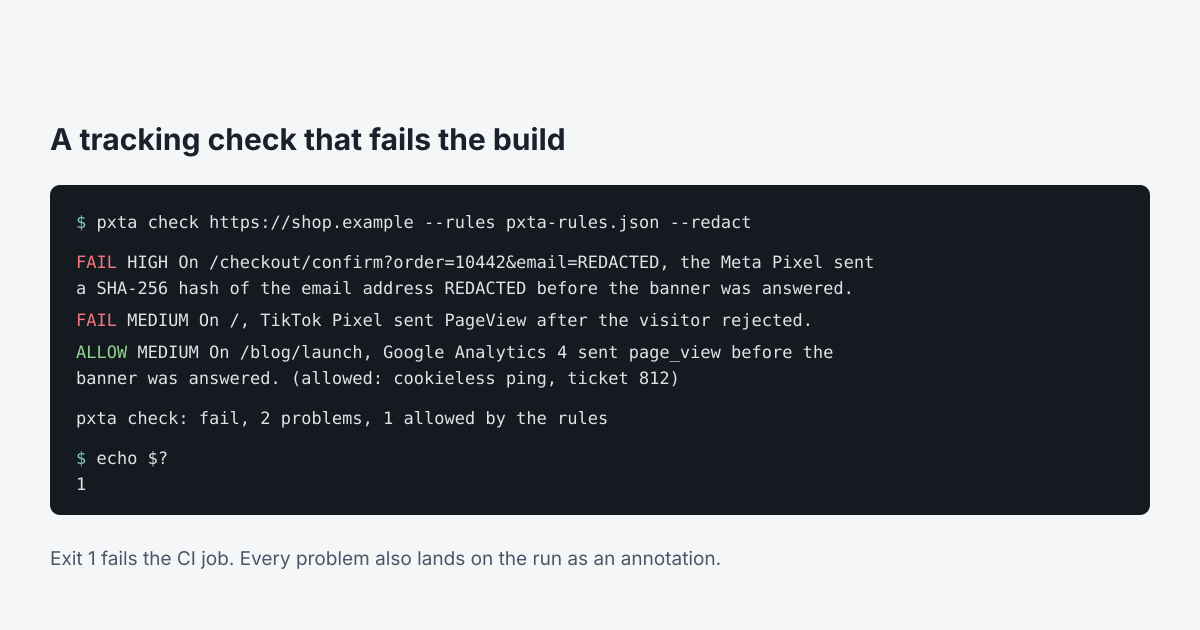
PXTA 0.2 adds pxta check. It runs the same audit and then judges it against rules. If a tag fires before the banner is answered, ignores a reject, or sends personal data before consent, it exits with 1 and the CI job goes red.
Without a rules file it fails on anything medium or high, and on a banner PXTA couldn’t answer, so a check that skipped its reject pass never passes quietly.
Rules You Can Defend
The rules file is short JSON. fail_on sets the severity that breaks the build. trackers.allow lists the trackers that may be on the site at all, so a new one added behind your back fails the check. trackers.block names ones that must never appear.
Exceptions go in allow, and each one needs a reason. That’s on purpose. If legal signed off on a cookieless Google Analytics ping on the blog, write the ticket number in the reason and the check lets it through, listing it as allowed with your words next to it. Add an until date and the exception stops working on that day, and the check says so. Exceptions don’t quietly outlive the decision behind them.
Reports You Can Pass On
A PXTA report holds whatever the site leaked: a customer’s email in an order address, the hash of it, a phone number in a form field. Reports from CI get attached to tickets and downloaded by people who never needed that.
--redact replaces those values with REDACTED in the report, findings.json and the request capture, in whatever encoding they arrived: URL-encoded, double encoded, inside JSON, inside base64. The finding still says the Meta Pixel sent a SHA-256 hash of the email address REDACTED, so the evidence of the leak survives without the leaked value. Then PXTA reads the files back and looks again. If anything is left, the run fails and the files are deleted, rather than leave a half-cleaned report around.
What stays is what describes the site: the trackers, the endpoints, the page paths, the search terms. The marker address PXTA types into forms stays too, since it’s the proof that a tag scraped the form.
In GitHub Actions
- uses: softdevstudio/[email protected]
  with:
    url: https://www.example.com/
    rules: pxta-rules.json
The action downloads the matching PXTA release, checks it against the published checksums, runs the check, puts each problem on the run as an annotation and the summary on the job page, and uploads the redacted report. Annotations are public to anyone who can see the run, so they never quote what the site sent, even without --redact. They name the tracker, the page path and the consent state, and the details stay in the report.
A weekly scheduled job on production, or one after each deploy, is enough for most sites. The quick start has the setup and the reference lists every rule field. The code and the full changelog are on GitHub.